Showing posts with label Windows. Show all posts

Monday, 16 December 2013

Windows Phone 8.1 will reportedly add notification center, Siri-like rival

Windows Phone 8.1 will reportedly add notification center, Siri-like rival

The forthcoming Windows Phone 8.1 update may prove that 8.1 is Microsoft's lucky number, as it's reportedly adding a notification center and Siri-like personal assistant to its mobile devices.

The Windows Phone 8.1 notification center will be revealed through a swipe-from-the-top gesture, according to unnamed Microsoft sources cited by The Verge.

Quick settings can be accessed with a short swipe down, while the most recent notifications are listed with a longer swipe in the same direction.

This matches how the Android notification center works and it's a combination of Apple's iOS 7 notification center and command center.

'Contra' to band together a Siri clone:


Even faster than changing settings through the new notification center may be asking the Windows 8.1 personal assistant to do it for you. Microsoft has been testing out its "Contra" technology for a number of months, according to the same report, with the intention of launching a rival to Google Now and Apple's Siri.

It's said to be able to anticipate appointments and map out the time it'll take you to get there according to data that it reads in a non-Scroogled way.

Other Windows Phone 8.1 tweaks:

Windows Phone 8.1 is likely to have notification center and Siri-like voice interaction as its main highlights, but there are several other tweaks that should please Windows Phone owners.The volume controls are said to be split into categories. A phone's ringtone volume can be independent of its media playback volume, for example.Bing Smart Search is expected to hit Windows Phone 8.1 just as hard as it did Windows 8.1.

Enterprise users will also benefit from added VPN support, and those who enjoy playing music and video on small devices may be listening to songs and watching videos through Xbox Music and Xbox Video apps taken from Xbox One.

Windows Phone 8.1 at Build 2014:

The notification center, Contra personal assistant and the other minor tweaks to Windows Phone 8.1 are said to be in internal beta testing right now.Moving forward, Microsoft is reportedly working to unveil all of these new features at its Build 2014 developer conference.
That means Windows Phone users will have to wait until April of next year to find out how their smartphones will get retooled and retiled with these much-needed features.
Windows Phone 8.1 Finally Getting iOS And Android Like Voice Assistant And Notification Center

When talking about Windows Phone’s shortcomings, most commentators and analysts regularly refer to the obvious lack of popular apps over at the Windows Phone Store – despite the recent introduction of Instagram and Vine to the WP scene. But while getting devs on board remains an issue, the OS itself is still missing some key features. Intuitive it may be; alternative – certainly; but with no real notification center to speak of, it’s still going to take longer to get things done on a Windows Phone. This could, however, be about to change with Windows Phone 8.1, for as well as a completely new system through which a user can digest notifications, there will also be a Siri-like voice assistant feature.

iOS and Android are way out in front of the rest of the chasing pack in the battle of the mobile operating systems, but with Microsoft’s heavy investment in both Nokia and the continued development of its fledgling smartphone and tablet OS, Windows Phone looks the likeliest of the current also-rans to step forth and make an imprint any time soon.

According to a report over at The Verge, “sources familiar with Microsoft’s plans” have divulged that Windows Phone 8.1 is in the process of being beta tested internally, and will include not only a notification center and Cortanta voice assistant, but also an easily accessible “quick settings” pane.
Apparently, quick settings will be found by swiping a short way down from the top, while a longer swipe will bring about the full notification suite. This is very much how things work with iOS and Android, and with this tried-and-tested mechanism having drawn few complaints from either side, it’s a wise move on the Redmond company to follow suit.

As for the voice assistant, “Cortana,” we’ve been hearing about it for the best part of a year, and according to The Verge report, it will replace Bing Search and will accommodate both voice and typed search queries, a la Google Now and Siri. The name is borrowed from the Master Chief’s voice assistant in Microsoft’s very own Halo, and it will be interesting to see, with both Google Now and Siri having been around for a while now, whether Cortana can establish it / herself once again, and help WP’s continued growth.

There will be some other implementations aside from the aforementioned, including separate volume controls for ringer sounds and media playback, and I’m sure as we near closer toBUILD 2014, which Microsoft already conceded will commence from April 2nd, we’ll hear of even more new and exciting features to be added to the fray.

(Source: TheVerge)

How To Check If Your Email ID And Password Has Been Compromised In A Cyber Attack

The modern day Internet world faces its biggest challenge right now, and users are affected with it – the data security nightmare. Every now and then, successful hackers manage to break through the security measures of a renowned database, exposing along the way the online identities of hundreds of thousands of users of these services. While the targeted companies manage to recover from these attacks over the course of time, users aren’t always so lucky, where most of them are often left wondering whether their critical info was a part of the leak or not. This is where Australian software architect Troy Hunt’s new project comes in.

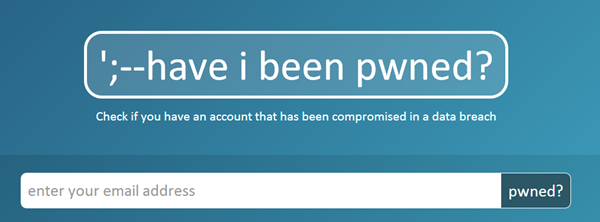
haveibeenpwned.com is a new Web service that allows you to check if your email address was a part of a security leak. As of now, Hunt’s website contains leaked user data from the breaches at Adobe Systems in 2013, the Yahoo! Leak in 2012, Sony’s infamous disaster from 2011, Start for from the same year, and the Gawker security breach in 2010. Hunt plans on adding more data to the list should they happen in the future (something we all wish wouldn’t happen).

To take advantage of the effort being haveibeenpwned.com, all you need to do is feed in your email address at the website, which will then run it against the data from the aforementioned security breaches and let you know if your supplied email address was a part of the list. There are other areas to explore as well, including an FAQs section as well as API support, but the primary functionality revolves around providing a central repository of leaked data and checking supplied email addresses against that. To that extent, the service works perfectly.

pwned

This is not the first website of its kind – security researches have come up with similar solutions after any such disaster in the past as well – but Hunt’s project aims at centralizing records to provide assurance against not one particular incident, but all of them, even in the future.

He does go on to discourage breaching a system just to contribute to the project, but something like this is bound to happen in the future as well. Hence, we find this portal useful now and again.

Sunday, 15 December 2013

Windows Phone 8.1 To Feature Android-like On-screen Buttons With Leaked Screenshot

There’s already little doubt that Microsoft will be changing things up with Windows Phone 8.1, the next update to the company’s somewhat undervalued and under-adopted mobile operating system. With the war against Apple and Google being lost, Microsoft knows it needs to make changes.

With BUILD 2014 already touted as being the first public outing of Windows Phone 8.1, rumors are about as to what Microsoft will change in its smartphone operating system. Talk of aNotification Center-like addition as well as Siri-like digital assistant using the voice of Halo’s Cortana has been the order of the day, and now renowned Twitter leaker @evleaks may have shown us an important step in the Windows Phone evolution.

HTC 8x

The leaked image appears to be a cropped screenshot of on-screen buttons that would replace the hardware ones that currently adorn every Windows Phone device. The well known Back, Start and Search buttons that sit below the screen of all Windows Phone smartphones currently on sale are shown in the screenshot, suggesting that Microsoft is about to move those hardware buttons into software. It’s a move that Google has been working with hardware makers to implement for a couple of years now with Android, and it seems that Microsoft will be joining in next year.

wp81screen

While it may initially seem rather inconsequential, this move could actually prove to be a master stroke. With Microsoft already struggling to get device makers to concentrate on Windows Phone handsets in a world where all the action is on Android, removing hardware buttons may make it easier for hardware partners to design one handset and then ship it with either Windows Phone or Android installed, reducing the development required as well as manufacturing costs.

Lumia-1520-yellow-back_632
Whether such a move would be enough to get Windows Phone further up the totem pole at the big hardware companies remains to be seen, but it certainly can’t hurt. We’ll find out at 2014′s BUILD conference by the looks of things, so until then we’ll just have to take @evleaks’ word for it.

How To Download Windows 8.1 ISO File Using Your Windows 8 Product Key

Windows 8.1 has gone public to address a lot of woes and complaints associated with its predecessor, Windows 8, and it does a pretty decent job at that. However, one thing that everyone noticed is the inability to download 8.1 ISO files directly. You see, Windows 8.1 is a free upgrade over Windows 8, but you cannot download the Windows 8.1 ISO. Luckily, a handy little tip shared in the steps below will let you download Windows 8.1 ISO from Microsoft.

We earlier brought to you a method to download Windows 8 ISO officially using the Windows Setup utility, and this method of getting the Windows 8.1 ISO using Windows 8 product key also adheres to pretty much the same principles. However, there’s a catch with this procedure. you cannot use it to perform a clean install. It will allow you to update an existing installation of Windows 8, so that saves you the download time and cost, especially if you’re on a metered connection or have multiple PCs that need to be upgraded to Windows 8.1.
Step 1: Visit Microsoft’s “Upgrade Windows with only a product key” page by clicking here and click the Install Windows 8 button.

Step 2: Wait for the setup utility to launch, enter your Windows 8 product key, and let the download begin.

Step 3: Once download starts, close the Setup utility.

Step 4: Now, return to the Windows Upgrade page from step 1, and this time, click the Install Windows 8.1 button. The setup will run again, but this time, it won’t ask for a product key. Instead, Windows 8.1 ISO will begin downloading right away.

Step 5: Once the download is complete, you will be presented with a new option, whereby you’ll see the following three options:
  • Install now
  • Install by creating media
  • Install later from your desktop
Step 6: Hit the Install by creating media option and click Next. Now, you’ll see two options as below:
  • USB flash drive
  • ISO file
Step 7: Use the ISO file option, and you’ll be asked to provide a location for saving the ISO file.
That’s pretty much there is to it. Once ISO is saved, the setup utility will even show the product key that you provided, which, as you’d notice, is the Windows 8 one that you provided the first time around.


© 2013 Tech News Reader. All rights resevered. Designed by Templateism

Back To Top